USB to HDMI Cable & USB-C to HDMI: A Complete Connectivity Guide for Modern Devices
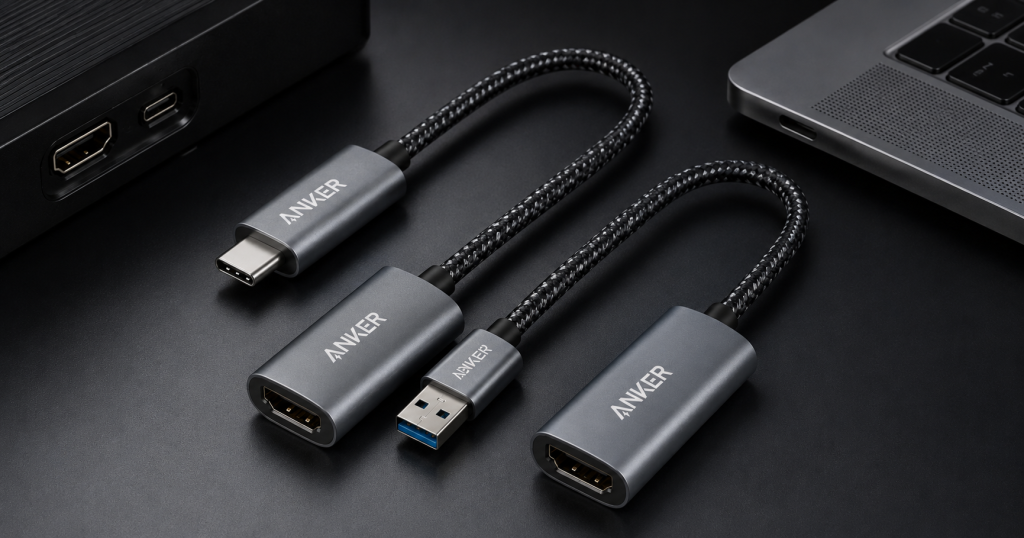
Modern devices are compact, lightweight, and very efficient. Some laptops, tablets, and smartphones, however, need an external display to work on, for gaming, watching videos, and for presenting. That’s where we’ll see the advantages of using a USB-to-HDMI cable or a USB-C-to-HDMI adapter. They facilitate easy connection of various devices to TVs, monitors, and projectors without compromising on video and audio quality.
What Is a USB to HDMI Cable?
A USB to HDMI cable is an adapter cable used for connecting two compatible devices. It is often plugged into an older laptop or a desktop computer without an on-board HDMI port. Some models need drivers to be installed; they do not work without them. The cable is inexpensive, and you don’t have to buy a new computer to tune it up and use it for more display options. It’s globally utilized in workplaces, learning centers, and families, exactly where an additional monitor can help productivity or be handy.
Understanding USB-C to HDMI
Modern devices that have a USB-C port are plugged into displays with an HDMI port through a USB-C to HDMI cable or adapter. This technology is supported by many new laptops, smartphones, and tablets via DisplayPort Alt Mode or Thunderbolt. This simplifies setting up quickly and easily. Unlike the older type of USB display adapters, the ones that are generated by USB-C to HDMI products in general are plug-and-play. Generally offer higher resolutions for displays like Full HD and 4K, and offer better video performance, output, and picture quality.
Key Differences Between the Two
They both support the connection of devices to HDMI displays, but are for different generations of hardware. A normal HDMI-to-HDMI cable would be used for USB-A ports, while a USB-C-to-HDMI cable would be used for gadgets with USB-C connectivity. Similarly, the performance is different for the two. Most of the time, USB-C connectors provide more data transfer speed, less latency, and better compatibility with today’s monitors. Earlier USB solutions might require extra software & hardware assistance.
Device Compatibility
Any potential buyers must ensure that they can get a video output from their device before buying any cable. Different USB ports have different functions, and some will not provide Display signals.USB port compatibility is important; not all USB ports can be used to transmit Display signals. A lot of modern laptops that have USB-C will be compatible with USB-C to USB-C, and almost all of the older ones will benefit from a compatible USB to HDMI cable. It is important to review the manufacturers’ specifications to prevent issues with compatibility.
Common Uses
In the world of business and PR, these display solutions can also be effective. Larger monitors are utilized by office employees for multitasking and projectors are used in presentations or internet learning sessions by teachers and students. Users also love being able to stream their movies or watch all of the family photos at home, on television screens. USB-to-HDMI or USB-C-to-HDMI cables both enhance the viewing experience.
Tips for Choosing the Right Cable
There are two things you need to keep in mind while choosing the right cable, these are the device you will use it with and its purpose. In the event that the laptop features a USB-C port with video output support, it’s best to go for a USB-C to HDMI cable, as it provides greater performance and is easier to set up. In the event you are left with just USB – A ports, a very good cable that connects USB-a to HDMI can be the answer. Only buy products from reputable brands to guarantee long lasting durability, easy connections, and reliability.
Future of Display Connectivity
Technology is constantly progressing, and many manufacturers are switching to the preferred connection, USB-C. It provides higher speeds, sharper pictures, and multiple functions on multiple devices by means of one cable. Despite this change, there are still times when people feel excluded and need solutions to transfer data between their old machine and the new one with the HDMI port. Even with this transition, students may still be left feeling like there is a gap and look for solutions to send data to the new changeover to the HDMI port on their old computer. Both technologies are still used by separate users and hardware.
FAQs
What is the main difference between a USB to HDMI cable and USB-C to HDMI cable?
A new cable wthatuses a uHDMIo hdmi connector is meant for connecting to the new compatible USB-C devices. musulmans utilize the USB-C to HDMI cable for this. The USB-C type typically has superior speed, picture, and setup. Please check compatibility of the device before buying.
Do all USB-C ports have HDMI output?
NO, not all USB-C ports are capable of transmitting video. It should have DisplayPort Alt Mode or Thunderbolt technology. It’s essential to determine the specifications of laptops and smartphones before purchasing a laptop/phone USB-C to HDMI cable. This lessens the chances of incompatibility problems.
Can I use these cables for 4K displays?
Indeed, some usb-c to hdmi adapters have the ability to utilize 4K resolution along with the appropriate gadgets and shows. Additionally, certain high-end models of the usb to hdmi cable enable high resolution. How it will be rendered will depend on the specifications of the computer, and the monitor the cable connects to.
Why is my USB to HDMI cable not working?
The issue could be due to unsupported hardware, display settings, or missing drivers. Sometimes simply restarting the device and updating the graphics drivers provides a remedy to the problem. In addition, check to see if you can output video from your computer via the USB port.
Which option is better for new laptops?
USB-C to HDMI cables are superior to normal HDMI to HDMI overall, as most new laptops are optimised for support of greater display resolutions and for increased performance. You can also get plug-and-play convenience for appropriate devices. Even older computers with no USB-C ports can take advantage of the versatility of a great usb to hdmi cable.
Conclusion
You will have to consider one of the two different cables when you come to the decision of what to choose: a USB-to-HDMI cable or a USB-C-to-HDMI cable. Both offer sound solutions for external monitor, projector, and television connections. Choosing a suitable, good-quality cable will provide smooth video output, better productivity and improved entertainment without much of a setup.







Post Comment