How to Customize Fonts and Styles in a Text Logo Generator
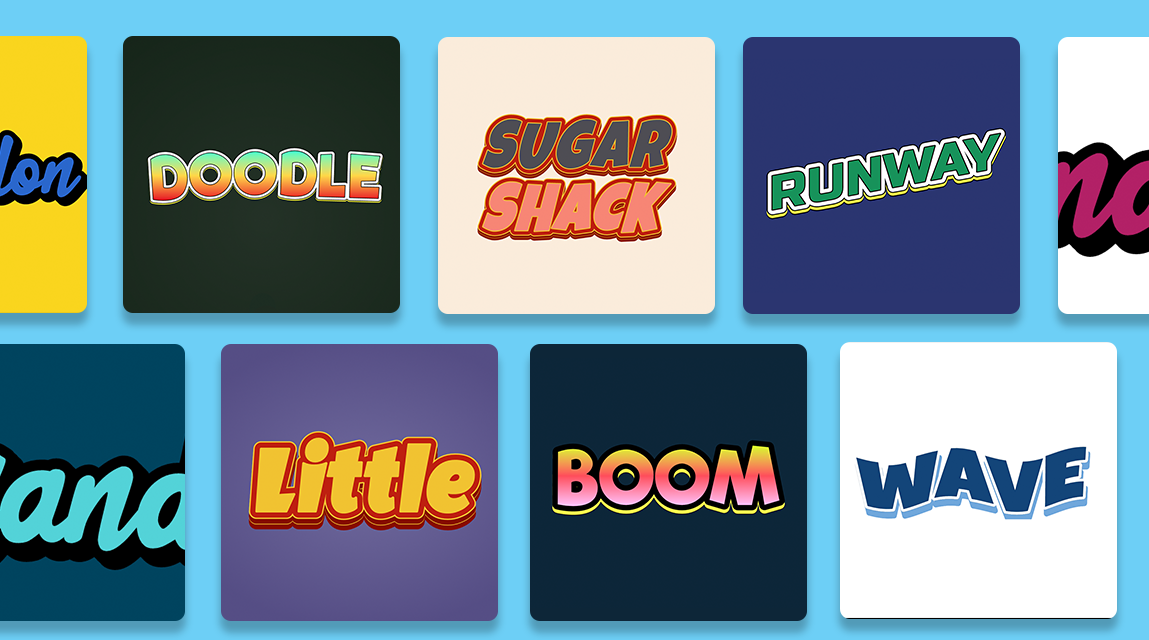
Making a unique logo isn’t a costly design software or professional’s job. Anyone can create a memorable brand mark with the use of the right approach and a text logo generator. Play with typography, color and effects in real-time with these online tools. If you want to make your baby products stand out from the pack, however, you must do more than the default. This guide will take you through all the necessary steps to customize fonts and styles and bring forth a great visual identity from a simple wordmark.
Understanding the Basics of a Text Logo Generator
Before you get into the nitty gritty of adjustments, it’s essential that you understand the use of a text logo generator. These will only be based on letters, as opposed to image-based logo makers. Type your brand name or your slogan, and it will show you your brand in different font and layout. The art of good customization is to understand the options available for levers to pull—namely the typeface, font weight, letter spacing, alignment, and decorative effects such as shadows or outlines. Most generators will show you a preview of what is going to happen, so that all the changes are immediate. First, select a template corresponding to the type of business you are in (serif for conventional businesses, sans-serif for modern startups and script for creative businesses). Keep in mind though, templates are meant to be a foundation, not a rule; it’s the uniqueness you get in your hands from adjusting each of the parameters that brings the magic.
Selecting the Perfect Font for Your Brand Identity
The font that you select says something about your personality without one of your words being read. A good text logo generator will have dozens, if not hundreds of fonts. Don’t go for the most fancy one. Rather, get more engaged with the legibility and emotional impact. While it may be a tasteful, bold serif like Garamond for an attorney at a law firm, or a clean, geometric sans-serif such as Montserrat for a tech business.
Mastering Font Styles: Weight, Spacing, and Effects
After selecting the base typeface, you can then define its style features. The best will text logo generator let you select the font, tracking, kerning, transformations intended for your text logo. The first method you need to play with is tracking: making it wider can make it airy/luxurious, and tight tracking will trigger an urgent or dense feel. Then try out the weight aspect. This use of a bold font gives emphasis but if accompanied by a lighter subtext, then hierarchy is achieved. Make sure you preview your design against a light background as well as a dark one to make sure that there’s enough contrast and readability.
Advanced Customization: Color, Shadows, and Layering
Beyond just creating a text logo, advanced capabilities in a text logo generator elevate it to a tool that evolves into a powerful and engaging brand mark. Customization of colour is of utmost importance. Most will allow you to use colors, colors and gradients or even textures. Use only two to three colors that support your brand’s psychology – such as blue for trust, red for excitement or green for growth. Use the generator eyedropper to take some colour samples from your website or from your work already done. Another effective method is the “layering effect”: have elements of text that overlap, with some parts of the text fading or being different colors. Certain generators have the ability to include shadows from inside the shape, outline (stroke) and even 3D extrusion. A semi-transparent shadow offset (45 degrees) is a good option for a modern design. Also, try using a geometric form behind or around the text, such as a circle, badge or bracket to tie the logo in place. Keep in mind that each effect added should be enhancing the legibility, and not distracting from it.
Tips for Testing and Exporting Your Custom Logo
After mastering fonts and styles, the last thing is to test and export it appropriately. Make sure that the font weight or spacing is adjusted as needed. The majority of generators will offer export in a number of formats including PNG with a transparent background for use on the web, SVG for scalable vector graphics and in some cases PDF for print. Never save a low resolution version, save a higher resolution version, 2000px wide or larger. Also, make sure that if the tool provides cloud saving of the project, you have an editable project file as well. Lastly, get the logo reviewed by a couple of impartial persons, they could possibly notice kerning problems and colour clashes you haven’t. Once these tests are completed, your custom logo will then serve as your brand’s representation.
Conclusion
It’s both an art and a science to customize fonts and styles in a text logo generator. You don’t need to hire a professional designer to make a professional grade logo by understanding how to use the right font, adjust spacing and font weights, use colors and effects sparsely and see the results in different situations. One of the great things about these tools is that they are accessible – they make design accessible to entrepreneurs and freelancers, hobbyists and everyone else. So when you need a logo, no need to use the complicated program – just open a text logo generator. Be bold in experimenting, trust your eye and don’t forget that sometimes things can be done simply. If you’re patient and practice, you will create a distinctive visual voice that will grab attention and gain recognition over the years.




Post Comment