Screen Recorder That Actually Works: Why iTop Is the Smartest Free Choice in 2026
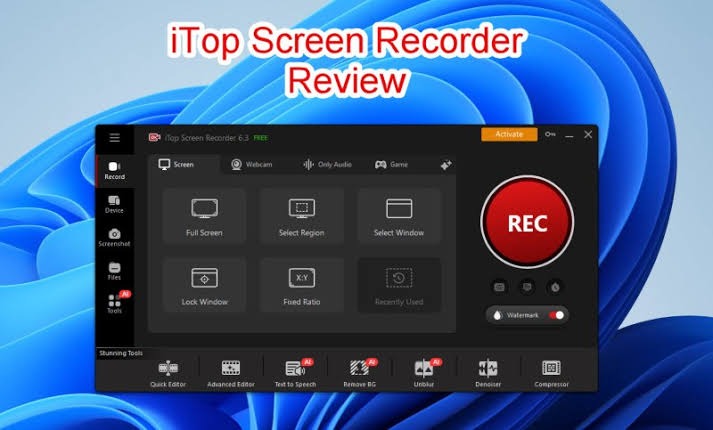
Screen recorder tools are everywhere in 2026, but finding one that is truly free, lag-free, and watermark-free feels almost impossible until you discover iTop Screen Recorder.
Most free options either crash mid-session, lock basic features behind a paywall, or produce audio so choppy it ruins the entire recording.
iTop Screen Recorder was built from scratch to solve every single one of these problems without costing you anything.
The Problem With Most Free Screen Recorders
Free screen recorders almost always come with a hidden catch. Some cap your recording at five minutes. Others drop frames during gameplay or crash right when it matters most.
A few do everything but lock the export button behind a subscription wall. iTop Screen Recorder eliminates all these frustrations and delivers a genuinely unlimited free experience from day one.
Record Screen, Webcam, and Audio Together
A quality screen recorder should never make you choose between capturing your display and your voice.
iTop lets you record your full screen, a selected window, or a custom region while simultaneously capturing microphone audio, system sound, and webcam footage in one clean output.
No syncing separate files. No missing audio tracks. Just one complete, ready-to-use recording every single time.
Crystal Clear Quality at Every Resolution
Resolution matters especially when viewers watch your content on large displays. iTop Screen Recorder supports 4K, 1080p, and 720p recording with hardware acceleration powered by NVIDIA, AMD, and Intel GPUs.
This keeps the entire process smooth and efficient, meaning quality stays high without pushing your CPU to its limits in the background.
Scheduled Recording Set It and Forget It
This is where iTop Screen Recorder genuinely stands apart from every competitor. The auto-scheduled recording feature lets you define a start time, end time, and recording task in advance.
Need to capture a live webinar at 3AM or record a time-limited online lecture automatically? The software handles it completely on its own even while you are asleep.
Screenshot Tool Built Right In
Why switch between multiple applications when one handles everything? The built-in screenshot tool captures your screen instantly in PNG, JPG, BMP, WEBP, and TIF formats.
Annotate directly on screenshots, highlight important areas, and save or share without ever opening a secondary app.
Edit and Export Without Leaving the App
After recording, the built-in video editor lets you trim, merge, add subtitles, insert background music, and apply filters before exporting.
Output formats include MP4, AVI, MOV, MKV, GIF, and nine more — covering every platform from YouTube to LinkedIn to professional client deliverables. Making iTop Screen Recorder a complete recording studio in one app.
Frequently Asked Questions
Does iTop Screen Recorder work on Windows 11?
Yes, it fully supports Windows 11, Windows 10, and Windows 8 with no compatibility issues.
Can I record internal audio without a microphone?
Absolutely. System audio recording captures all sound playing through your PC independently from the microphone.
Where can I download it safely?
Always download from the official screen recorder page to get the verified, malware-free version.





Post Comment